

How to see what your AI team is really working on

How a data team works can matter as much as what it builds. In this post, I show the simple setup we use so that clients can see our work as it happens, and so that their data never sits on anyone’s laptop.
This setup usually brings new clients a lot of satisfaction. We’ve used it to share work with chief executives, technology leaders, developers and other data scientists, and all of them can follow it.
Two ways to do the same work
Consider two cases.
Jamie opens her laptop, opens a browser tab, logs in to a company web page, and sees all her work alongside her team’s. She pulls data from a cloud data store and picks up yesterday’s analysis.
Sean opens his laptop and starts Python in a terminal. While it loads, he connects to a company database, runs a query, and saves some data to his laptop for the analysis he needs to run.
Jamie and Sean will reach the same result, but how they get there is very different. Jamie uses cloud tools for the heavy lifting: processing the data and building the models. Sean relies on his laptop for all of it, including storing the data. At the end of the day, both save their code to GitHub, where it’s easy to share and review.
Why it matters
We care about this a lot, because we want to be able to tell every client that their data was never downloaded to our machines. If Jamie processes five terabytes of data, almost none of it touches her laptop. If she’s out sick and forgets to save her work to the shared repository, it’s still on a cloud disk and can be retrieved at any time.
Set up this way, your team gets:
- Full visibility into the work, at a level an executive and an analyst can both follow
- Far less exposure to data loss or a breach
- The satisfaction of knowing their work is seen and understood across the company
That last point matters. Analytics people, as much as anyone, want their work to be understood outside their own team.
The setup
You can put a basic version in place for your team in about half a day on any of the major cloud providers.
- Give your team a shared online workspace for notebooks, the documents data scientists use to mix code, results and notes. Google Colab and the managed notebook services from the large cloud providers all work.
- Use GitHub as the shared repository. It displays notebooks the way the data scientists see them, with the text, code and charts in place.
- Make sure your team knows how to pull data from your data stores directly into their notebooks, without saving copies locally.
That gives you company-wide access to the work, if you want it.
What a notebook looks like
Here’s a page from a typical notebook, with my notes in blue:
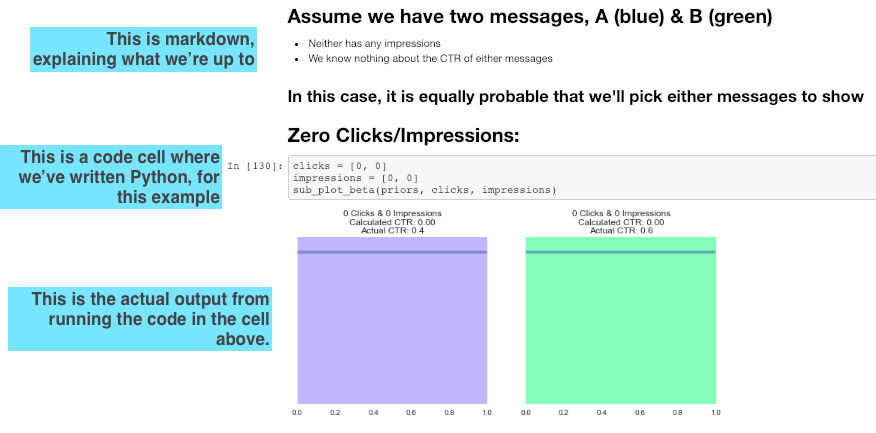
GitHub shows it exactly as the data scientist sees it. The written explanation makes the analysis easy to follow, and the charts tell the story. In many cases, a notebook like this is enough to show management, with no slide deck needed. I’ve spent thousands of hours building presentations that could have started from a notebook.
The result
With this setup, you can see your team’s work whenever you want. If a laptop goes missing, nobody gets your data or your analyses, because they were never on the laptop. Two things protect you: the cloud login, and your ability to shut off access in seconds.
We still work this way. Our engineers build inside your systems, so your data stays where it is, and Bennett ONE records every step with its source so you can see exactly what was done. I also list this as a contract point in how to choose an AI consulting firm.